


You handed over the package. Amazon sent the email. Now you’re looking at your bank account, wondering why the refund still hasn’t shown up.
If Amazon has actually issued your refund, the next thing to check is where it went and how long that payment method takes. A credit-card refund usually needs another three to five business days. A debit-card refund can take up to ten business days. An Amazon gift-card refund is much quicker: the published estimate is two to three hours.
Those estimates start after the refund is issued. If Amazon is still waiting for the item or processing your return, you’re at an earlier stage.
That distinction saves a lot of frustrating back-and-forth. Here’s how to work out where your money is, what the status means and who can help when something has stalled.
Check these three things first
Was the refund issued, or did you only start the return? Open the item’s refund details in Amazon’s Your Returns.
Where was it sent? Check the selected card, account or Amazon gift-card balance.
How long has it been since issue? Count the payment method’s processing time from that date, allowing for business days where specified.
How long does an Amazon refund take?
There are two parts to the wait: Amazon receiving and processing the return, then the payment method making the money available.
Amazon’s standard return policy says receiving and processing a return can take up to 30 days, with longer timeframes possible in some circumstances. Its refund help also says timing depends on the order, return shipping, processing and payment method. That doesn’t mean every return takes a month. It does mean a refund isn’t necessarily late because it didn’t arrive when the parcel was scanned at the drop-off counter.
Once Amazon issues the refund, its published payment estimates are:
| Refund destination | Published processing estimate after issue |
|---|---|
| Amazon.com Gift Card or gift-card balance | 2–3 hours |
| Credit card | 3–5 business days |
| Shop with Reward Points | Up to 5 business days |
| Debit card | Up to 10 business days |
| Checking account | Up to 10 business days |
| EBT card | Up to 10 business days |
| Cash at a participating location | Up to 10 business days |
| Prepaid credit card | Up to 30 days, depending on the issuer |
| Promotional certificate | No refund issued |
Use the estimate for the destination shown in your refund summary. The card you originally paid with and the refund method you selected are not always the same.
For example, if Amazon issued a credit-card refund on a Friday, not seeing it on Sunday is no surprise. Three to five business days is different from three to five calendar days. Likewise, a debit-card payment doesn’t inherit the shorter estimate just because the card has a Visa or Mastercard logo.
Find the refund details before opening another support chat
Start in Your Returns on Amazon. Find the returned item under the Last 3 Months section and open its refund details. You can also use Return/Refund Status from your return confirmation email.
Look for the amount, destination and issue date. Amazon says issued refunds have visible details and a detailed email summary. Its Your Transactions area is another place to check payments and refunds.
This is worth doing even if you’ve already spoken to someone. A support conversation saying that a refund has been requested doesn’t give you the same information as an issued-refund record. You want to know what has happened to the particular item, rather than rely on a reassuring message about the order in general.
If you returned two items, check each one. One refund arriving doesn’t prove the other has been completed. Match the amounts to the products before deciding the total is short.
What stage is your return actually at?
The exact wording can vary, but these are the useful distinctions:
| What has happened | What it tells you | What to check next |
|---|---|---|
| You created the return | Amazon has your request | Drop-off or pickup instructions and deadline |
| You handed the item over | The return has entered the handover or carrier process | Acceptance receipt and tracking |
| The parcel was delivered back | Transport has reached the destination | Amazon’s return-processing and refund details |
| Amazon issued the refund | The refund has been sent to the stated method | Destination and payment-method processing time |
| The money is available | The payment stage is complete | Amount and any explanation of deductions |
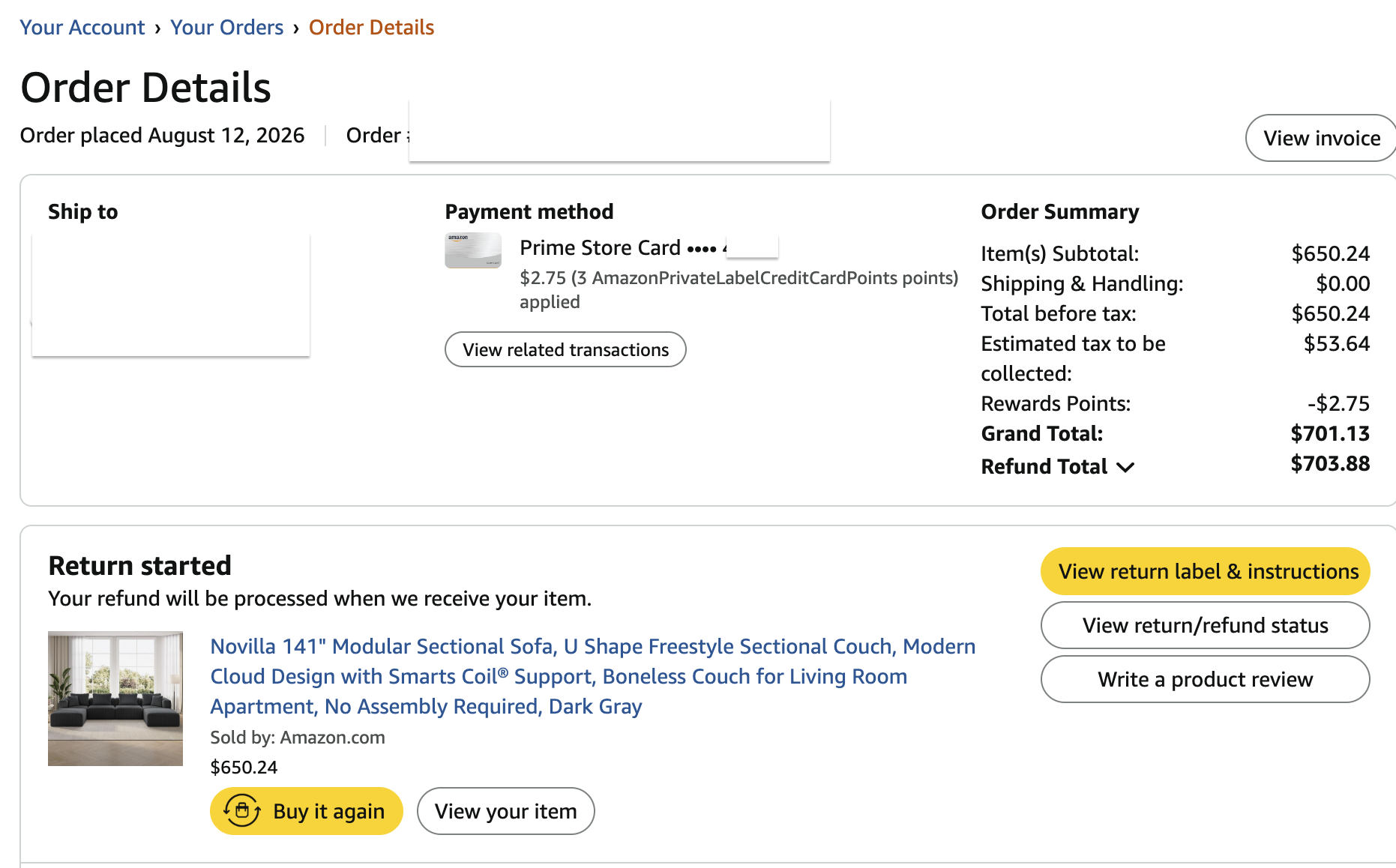
Open the redacted order screenshot at full size
The screenshot above shows a Refund Total in the order summary, while the item says Return started and “Your refund will be processed when we receive your item.” A displayed amount and an issued refund are different pieces of information. Check the individual item’s return/refund details for an issue date before counting the payment method’s processing time.
Treat this as a way to read the situation, rather than a promise that your account will show these exact labels.
The common mix-up is between the middle two stages. A delivered parcel is good evidence that the shipment reached its destination. It doesn’t prove the contents have been checked and the refund issued. Conversely, once Amazon has issued the money, repeatedly checking the return carrier won’t tell you when your bank will display it.
Amazon says the refund was issued, but your card shows nothing
First, confirm you’re checking the right place. Open the refund summary and compare the destination with the card or account you’re viewing. Check the credit or transaction history as well as any balance display that may update differently.
Then compare the issue date with the relevant estimate. For a credit card, Amazon lists three to five business days. For a debit card, it lists up to ten. If you’re still inside that period, keep the confirmation and watch the account rather than starting a new return for the same item.
If the period has passed, contact the bank or card issuer with the refund amount, issue date and any reference Amazon has supplied. Ask whether it can locate the incoming refund. If it cannot, return to Amazon with that answer and ask it to confirm the destination and investigate the payment.
A useful question is: “Can you confirm when this refund was issued and which payment method received it?” That gets you closer to the missing piece than asking everyone why a return is taking so long.
Check your Amazon gift-card balance too
A refund can be in your Amazon account rather than your bank account.
Amazon’s refund-status help says the money goes to the method selected in the Online Returns Center. Its refund help also says that if it cannot use the original payment method, such as an expired card, the refund goes to the Amazon account balance.
That gives you two reasons to check the refund summary and gift-card balance before assuming the money disappeared. Don’t select a gift-card refund simply because the published estimate looks quicker unless you’re comfortable having the money available for Amazon spending instead of back with your original payment method.
Gift returns have another distinction. When the recipient creates the gift return, Amazon says the refund goes to the gift-card balance of that account. When the gift purchaser returns it, the refund follows the method selected in the Returns Center. The recipient shouldn’t expect a credit to the giver’s card to appear in their own banking app.
Your return was delivered, but Amazon still hasn’t refunded it
Now the question is about Amazon’s processing, rather than the bank’s posting time.
Keep the carrier acceptance receipt, tracking number and delivery record. Check whether Amazon has supplied an estimated refund date or asked for additional information. Its standard policy says receiving and processing can take up to 30 days, and some cases can take longer.
If Amazon requests information, respond through its official account or Customer Service channels. A parcel can arrive while the return still needs review; another support chat won’t substitute for information the team has specifically requested.
Amazon’s refund page tells customers to contact Customer Service if they returned an item more than 30 days ago and haven’t received refund notifications. If the account shows an error, the wrong item or a request you don’t understand, ask about that issue when you notice it. You don’t need to wait a month to report a clear mismatch.
An early refund can still come with a return deadline
Some refunds arrive unusually quickly. Amazon calls a refund issued when the carrier first scans the return an advanced refund. It happens before Amazon receives and processes the parcel.
You still need to follow the return instructions. Amazon says to use the correct label, return the item in its original condition, use an approved location and meet the deadline in the confirmation email. If the required return doesn’t arrive within the return window, Amazon describes a reminder followed by a charge for the advanced refund or replacement. It says that charge is reversed once it receives and processes the return.
So keep the drop-off receipt even after the money appears. It connects the refund to the parcel you actually handed over.
A returnless refund is different: Amazon or the seller has explicitly told you the item doesn’t need to go back. We explain that distinction in why Amazon sometimes refunds you without a return.
What changes when a third-party seller shipped the order?
Check who sold and shipped the item. If a third-party seller shipped its own inventory, the return normally goes to that seller rather than an Amazon fulfillment center.
Amazon’s customer help says the seller usually processes the refund within two business days after receiving the return. Return shipping delays, an untrackable parcel, a different item arriving or condition problems can hold that up. The payment method can then need its own processing time.
Contact the seller through Amazon so the conversation stays attached to the order. Keep your acceptance receipt and delivery evidence. If the seller doesn’t respond within 48 hours, Amazon’s seller-return help describes an A-to-z Guarantee refund request for specified unresolved situations, including an expected refund missing after a return made in line with the policy. Check the requirements for your order; the guarantee isn’t an automatic refund for every disagreement.
Amazon fulfillment and Amazon as the seller are also different. A third-party product shipped by Amazon doesn’t follow the same logistics as one the seller shipped from its own premises.
Why was your refund smaller than what you paid?
A refund that arrived with a deduction needs a different investigation from money that hasn’t arrived at all.
Open the refund breakdown. Amazon lists possible return-shipping, late-return, damage and restocking charges, with the applicable conditions depending on the item and situation. The original purchase may also include delivery or promotional amounts that don’t come back in the way you expected.
Compare the merchandise amount, taxes, shipping and each deduction separately. If you returned one item from a larger order, compare against that item’s paid amount rather than the entire checkout total.
Here’s an illustration: you expected $80 back and received $72. Ask what accounts for the $8 difference. That is a more useful starting point than assuming another $8 payment is still on its way. If the reason appears wrong—for example, an item arrived damaged but was treated as a preference return—explain the actual circumstances and provide the evidence you have. Our restocking-fee guide explains how to question a deduction.
A short message that helps support find the problem
You don’t need a long account of every frustrating conversation. Give the person helping you the dates and the missing stage.
For a parcel that arrived but has no refund notification, try:
I returned this item on [date], and tracking shows delivery on [date]. I haven’t received a refund notification. Can you confirm whether the return has been processed, whether anything is needed from me and the expected next step?
For an issued refund missing from your payment account:
My refund summary shows [amount] issued on [date] to [payment method]. The stated processing period has passed, and I can’t locate it. Please confirm the destination and provide any payment reference available for follow-up.
Have the order number ready in the official support conversation. Keep full card numbers and other sensitive payment details out of an ordinary message. Save the case reference and the answer about what happens next.
Three questions shoppers often ask
Can you make Amazon refund you immediately?
You can follow the available return options and ask about an overdue refund, but you can’t assume every order qualifies for an advanced or returnless refund. A quicker gift-card posting estimate also doesn’t remove Amazon’s return-processing stage. Choose the destination that suits you, then use the actual refund details to track it.
Does a refund email mean the money is already in your bank?
No. Read what the email confirms. If the refund has been issued, the relevant payment-method estimate still matters. If the message only confirms the return request or handover, you may not have reached the issued-refund stage yet.
What if the original card has expired?
Check the destination in Amazon’s refund details before chasing the old card. Amazon says a refund it cannot issue to the original method goes to the Amazon account balance. Ask support to confirm the handling for your transaction if the record is unclear.
Before you check your bank account again
Find the refund’s issue date, destination and amount. Start there, rather than counting from the day you clicked Return.
If the parcel is still moving, follow the return. If Amazon is still processing it, follow up with Amazon when the stated timing or account information calls for it. If the refund has been issued, use the payment method’s timeline and the refund confirmation to trace the money.
For the deadlines and conditions that apply before that stage, see our Amazon return-policy guide.